Plante Line · Technical Support

Ceres System
Channel

Sonoff Hydro ONE straight off the pressurized mains + channel manufactured by Plante. For vertical gardens with a water point nearby, pump-free. The most elegant line in the Plante portfolio.

Pump-free Plante Channel Zigbee 3.0 INPI Registered Trademark
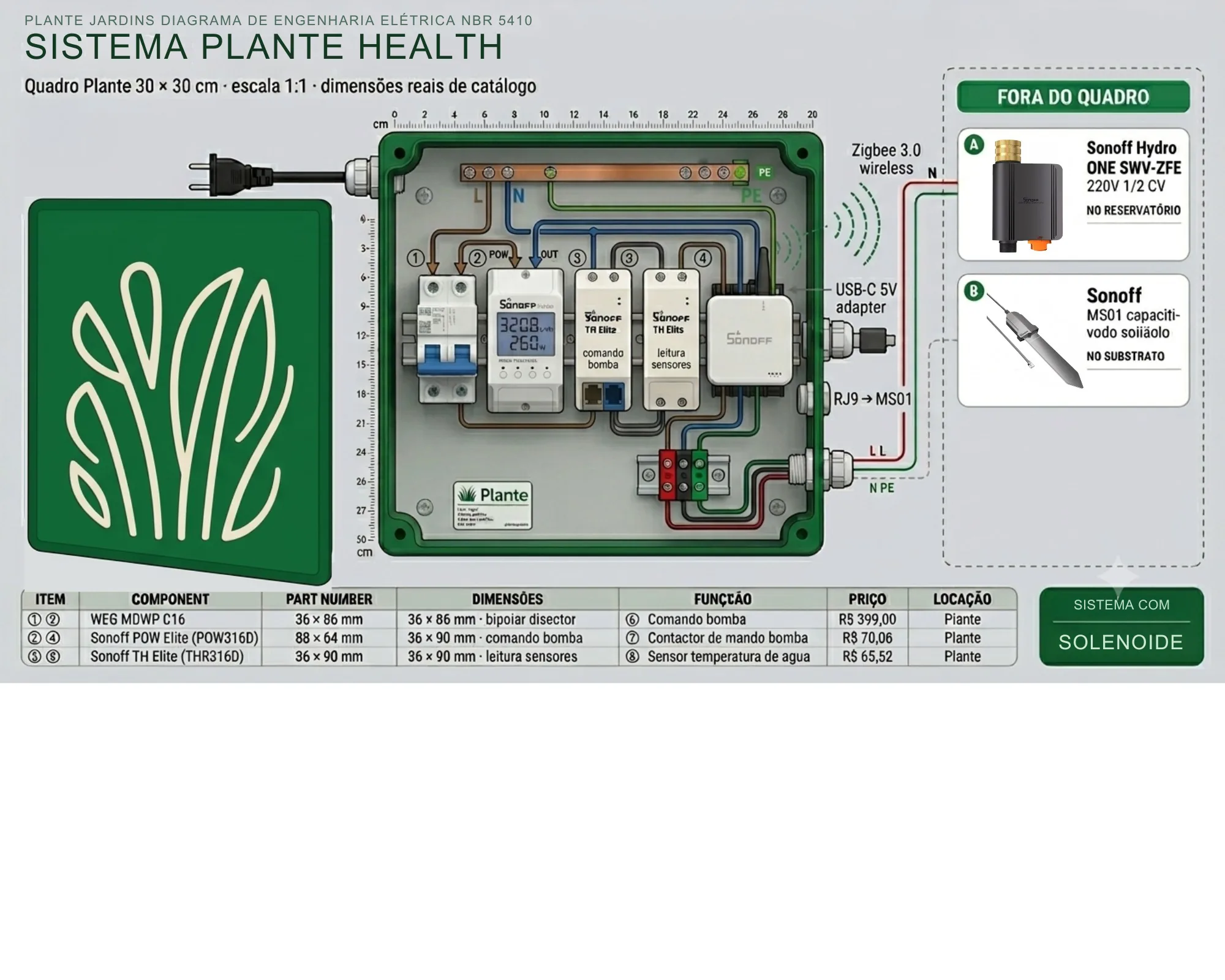
Electrical engineering diagram

The Plante panel schematic.

Interior view of the 30 × 30 cm panel at actual scale, with Sonoff POW + TH Elite + ZBBridge Pro on the DIN rail and a reference to the Hydro ONE on the water line. Print it, laminate it and fix it inside the panel for the field technician to consult.

Ceres System technical diagram · Channel

High-resolution diagram · revision A · NBR 5410 / IEC 60715

Before anything else

Water safety is life.

Vertical plants die in three days without adequate irrigation. Before any intervention on the electrical panel or on the Hydro ONE, notify the responsible Plante reseller and the end client. Plante does not authorize prolonged shutdowns without prior notice.

Mandatory intervention protocol
  1. Switch off the 16A WEG MDWP two-pole circuit breaker
  2. Close the water supply valve feeding the Hydro ONE
  3. Confirm zero voltage at the terminals with a multimeter
  4. Photograph the original state of the panel (Plante forensic record)
  5. Log the intervention in the Plante app via the equipment's QR code
System philosophy

Elegance without a pump.

The Ceres System does away with the pump and the intermediate reservoir. The pressure of the client's water mains feeds the Sonoff Hydro ONE SWV-ZFE directly — a smart Zigbee valve with a native flow meter (2–45 L/min), dry-run protection and six local scenes that run even without internet. From the Hydro ONE outlet, water goes straight to the irrigation hoses serving the channel manufactured by Plante (we do not use PVC or generic gutters).

A Sonoff TH Elite with a Sonoff MS01 sensor measures substrate moisture and triggers the irrigation command to the Hydro ONE via a Zigbee scene. The Sonoff POWR316D Elite sits at the panel inlet as the electrical guardian (V/A/W/kWh, surges) and the Sonoff ZBBridge Pro bridges Wi-Fi ↔ Zigbee 3.0 at no recurring cost — it works on the local LAN and syncs with the Plante app via the eWeLink API.

A lean setup, ideal for apartments, shops, corporate receptions and homes with a water point up to 8m from the garden.

Bill of Materials

Official Plante components.

The Plante warranty covers exclusively systems assembled with the models below. Replacements outside this specification void the contract. Reference prices from AliExpress Brazil (June/2026) — resellers buy directly, with no dependence on Plante for replacements.

ItemModel / Part NumberFunctionR$ Ref.
Wi-Fi electrical guardianSonoff POWR316D Elite 20AMonitors V/A/W/kWh + native LCD display94,54
Moisture controllerSonoff TH Elite (THR316D)Dry contact + LCD + RJ9 sensor port131,13
Substrate moisture sensorSonoff MS01 (RJ9)Capacitive IP55, plugged into the TH Elite70,06
Valve + flow meterSonoff Hydro ONE SWV-ZFEZigbee solenoid + flow 2–45 L/min + native dry-run211,37
Zigbee bridgeSonoff ZBBridge ProWi-Fi ↔ Zigbee 3.0 (local scenes without internet)115,11
Two-pole circuit breakerWEG MDWP C16 220VGeneral electrical protection 16A C curve39,00
Plante panelGreen 30×30cm fiber with embossed logoEnclosure manufactured by Plante to IP54100,00
Plante channelChannel manufactured by PlanteIncluded in the garden's price per m²
Total panel componentsR$ 761,21
Direct plumbing The Hydro ONE outlet connects directly to the irrigation hoses that feed the Plante channel. There is no intermediate box, no generic PVC and no reservoir — the entire channel is manufactured by Plante and is an integral part of the garden.
NBR 5410 standard

Color code and gauge.

Cabling follows the Brazilian electrical installation standard. Any certified electrician can carry out replacements without needing specific Plante training — Sonoff devices are sold in physical stores in Brazil and on Mercado Livre.

BlackLive (L) 220V — supply
Light blueNeutral (N) 220V — return
Green-yellowEarth (PE) — protection
Thin greyMS01 RJ9 signal (moisture)

Recommended gauges: 2.5mm² on the 220V runs (panel power), standard Sonoff RJ9 cable up to 10m with an AL560/RL560 extension. The Hydro ONE runs on an internal rechargeable battery + Zigbee — no electrical cabling to the valve.

Maintenance procedures

Authorized replacements.

Replacing the Sonoff Hydro ONE

  1. Close the upstream water valve
  2. Switch off the circuit breaker as a precaution
  3. Wait for full pressure relief (5 minutes)
  4. Unscrew the 3/4" plumbing connections from the Hydro ONE
  5. Install the new module respecting the flow arrow on the housing
  6. Pair via BLE proximity in the eWeLink app (ZBBridge Pro nearby)
  7. Switch the breaker back on, reopen the valve, and run a 30s test in the app
  8. Confirm a flow reading of ≥ 2 L/min on the app screen

Replacing the Sonoff TH Elite

  1. Switch off the two-pole breaker and photograph the 4 labeled terminals
  2. Disconnect L IN, N IN, L OUT, N OUT
  3. Remove the MS01 RJ9 connector
  4. Release it from the DIN rail and install the new TH Elite
  5. Reconnect the cables following the Plante labels
  6. Plug the RJ9 sensor into the new module
  7. Switch the breaker back on and pair in the eWeLink app

Replacing the Sonoff ZBBridge Pro

  1. Disconnect the USB-C power supply from the ZBBridge Pro
  2. Remove it from the internal bracket in the panel
  3. Install the new bridge in the same position (Zigbee signal ≥ -70dBm to the Hydro ONE)
  4. Reconnect the power supply and wait 60s for boot
  5. Re-pair the Zigbee devices (Hydro ONE + future sensors) via the app
  6. Restore the 6 local scenes from the Plante app backup

Replacing the Sonoff MS01 (soil moisture)

  1. No need to switch off the breaker (the sensor is low voltage)
  2. Disconnect the RJ9 connector from the TH Elite
  3. Carefully remove the probe from the substrate
  4. Install the new MS01 at the same depth (8-12 cm)
  5. Connect the RJ9 and wait 60s for the app to report a valid reading
  6. Calibrate the minimum moisture level in the app (saturated substrate = ~70%)
Diagnostics

System error codes.

The Plante app reports coded alerts consolidating the Sonoff states via the eWeLink API + ZBBridge Pro telemetry. Use this table before contacting support.

CodeMeaningRecommended action
NO_WATERHydro ONE detected no flow after opening the valveCheck the upstream valve, hose, filter
SUBSTRATO_SECO_CRITICOMS01 below 25% for more than 6hForce a manual cycle and check the hoses
FLOW_HIGHFlow > 45 L/min — possible hose ruptureClose the valve and inspect the water path
ZIGBEE_OFFLINEZBBridge Pro lost contact with the Hydro ONECheck distance, obstacles and the bridge power supply
VOLTAGE_LOWPOW: voltage < 200V for 30sInspect the client's electrical network
VOLTAGE_HIGHPOW: voltage > 250V for 30sHardware at risk — alert the Plante Matrix
SURGE_DETECTEDSurge or severe fluctuation on the networkCheck lightning rods and building grounding
WIFI_OFFLINEZBBridge Pro off the cloud for more than 5 minutesRestart the router or check the Wi-Fi password

Even offline, the Hydro ONE keeps its 6 local scenes programmed and its native dry-run protection — irrigation keeps working.

When the problem persists

Plante 24-hour technical support.

Before calling, have on hand the ID of the POW, the Hydro ONE and the ZBBridge Pro, the project address and photos of the panel and the faulty part. These elements make up the forensic package of the call and speed up resolution.

Technical assistance

Plante direct line

+55 85 9 8945-8821

Priority WhatsApp · 24h on-call, every day

Warranty conditional on the integrated system The Plante warranty is valid exclusively when the system keeps all the original components specified by the factory. Unauthorized replacements (especially swapping the Hydro ONE for a generic 24V solenoid) void the coverage. If in doubt, consult the regional Plante reseller before the intervention.

Are you an architect or contractor?

Bring a Plante vertical garden to your project. See the portfolio of large-scale projects and talk to me.

See projects Talk about my project